


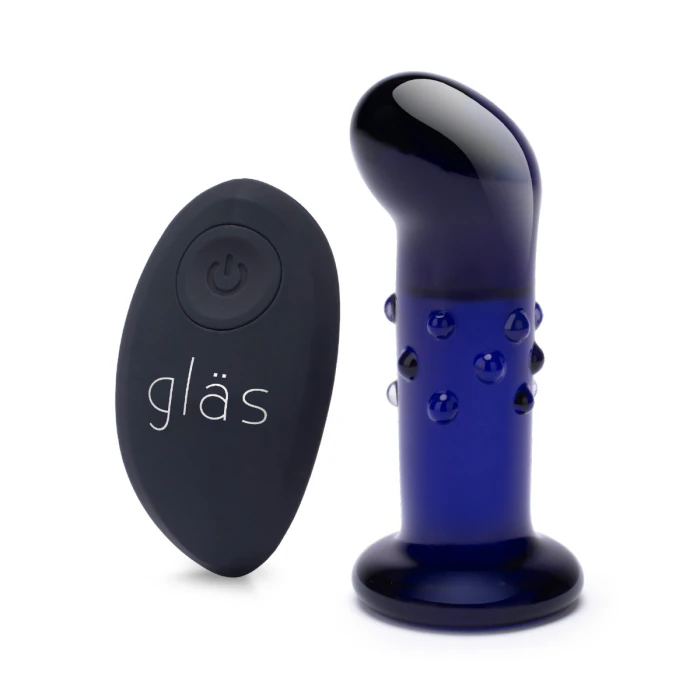


4 inch rechargeable remote-controlled vibrating glass dotted butt plug



 NO TRICKS, JUST TREATS! Up to 5 Free Toys on $119+.
  View Gifts
Exclusions apply. Grab Yours!
View Gifts
Exclusions apply. Grab Yours! 


- Material:Borosilicate Glass
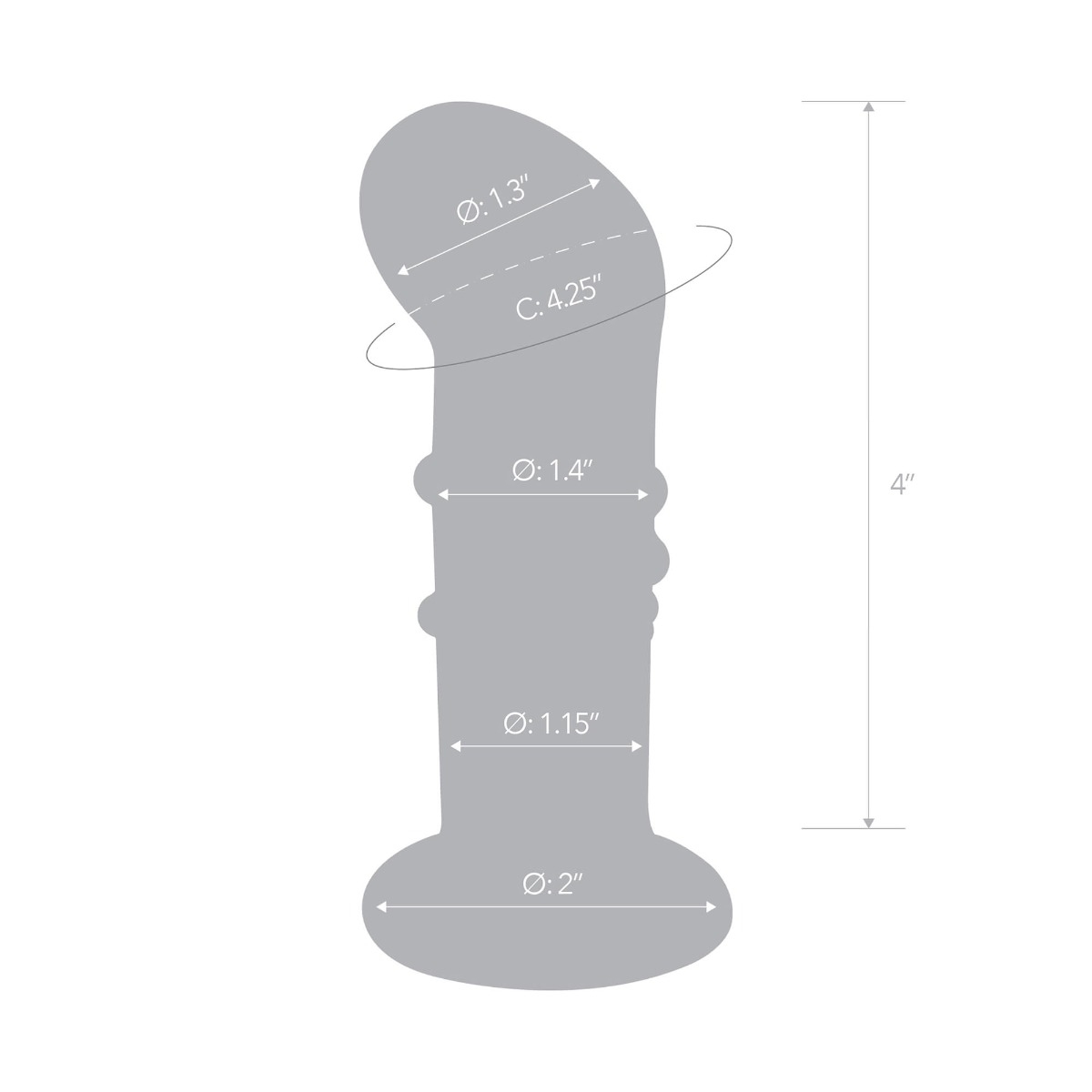
- Butt Plug Height: 4.5 in / 11.43 cm
- Insertable Length: 4 in / 10.16 cm
- Weight: 221 g / 0.49 lbs
Discreet Shipping
Your privacy is of the utmost importance to us and with our discreet packaging you can shop in confidence. With totally plain packaging, the only person getting excited by your delivery is you. Read how we discreetly deliver your goods.
Product Warranty & Registration
We stand behind our products with easy to understand, hassle-free warranties. To help us serve you better, we strongly encourage you to keep a copy or picture of the receipt and register your product with us if you purchased it from elsewhere, other than bvibe.com — Register your b-Vibe here.
I received the wrong order. What should I do?
We apologise for the inconvenience caused. To receive the right item, simply process a return by contacting us.
How do I return or exchange my b-Vibe product(s)?
All b-Vibe products are covered by our one (1) year limited warranty, from the date of original purchase, against defects due to faulty workmanship or materials.
If you discover a defect and notify us via customerservice@bvibe.com, b-Vibe will, at its own discretion, replace the product free of charge.
Please note that due to nature of pleasure products:
- • b-Vibe cannot accept non-defective exchanges on items that have been opened.
- • As per industry standards, pleasure products may not be returned unless they are defective.
- • A shipping charge will only be refunded in cases where our error caused the return.
- • All returns and exchanges require pre-authorisation in the form of a receipt of purchase.
My product was damaged / already opened upon delivery. What should I do?
If you find that your product has been damaged or opened, or that its contents are missing, please ensure that you take a photograph of the packaging and email it to customerservice@bvibe.com with the appropriate subject title - Damaged / Opened / Missing Product when delivered by UPS / USPS.
Loved by Experts & Press
Check out all the latest Press Features & Media Mentions. View All


b-Vibe is one of the best brands in the game when it comes to butt stuff.
b-Vibe bridges the gap between body-safe innovation and comprehensive education, giving individuals the confidence to embrace their desires safely.

Butt plug makers b-Vibe have put together an impressively well-rounded butt plug training kit… You couldn’t ask for a better introduction to the world of butt stuff.
I have one toy that I use quite often: it's from b-Vibe and it's a vibrating butt plug that's also a cock ring, and that's often what I wear while topping - which I love!

When it comes to anal play, b-Vibe is your one-stop shopping destination.
b-Vibe has members of the LGBTQ+ community in every department. This is important as it means queerness is part of their infrastructure and integrated into all of their marketing and product development.

Trusted anal sex-toy brand b-Vibe’s products are designed to mitigate this risk. We offer anal-safe products with innovative designs that address specific, often unaddressed, sources of anal pleasure.

When it came to anal toys, the brand b-Vibe, which specializes in anal plugs, is extremely popular.

Men may find that having their prostate stimulated triggers earth-shattering orgasms, and women might find anal insertion pleasurable as well. With that in mind, consider the Rimming Plug 2, an upgrade of the original b-Vibe, which is fast becoming a leading name in anal play.

The b-Vibe Rimming Plug 2 has opened up a whole new world for me.

Founded by sex educator Alicia Sinclair, b-Vibe's a new sex toy company offering an innovative take on anal pleasure-and betting that a combination of high quality toys and anal education will put them in the position to be the Apple of butt sex. Will butt plugs ever go fully mainstream? It's about time.


Alicia Sinclair knows all about sex toys, as she invented the b-Vibe, a collection of vibrators made exclusively for anal play. Incorporating toys into your sex life is also a great way to achieve orgasm through anal. And who wouldn't want to have an insane anal orgasm?!

For folks with genital dysphoria, I recommend the b-Vibe Anal Training Kit. The kit features a trans-inclusive guide to anal play, an enema, a lube launcher, and three plugs for training your rear.

I purchased the rimming plug petite after the thrilling experiences I had with the Snug Plug. The rotating beads in the neck on their own are amazing and then add in the vibrating tip... exhilarating!!!

